


Product images play a major role in ecommerce. Customers use them to compare products, check details, and decide what to buy. But search engines cannot interpret every detail of an image in the same way a person can. Screen reader users also need a text alternative to understand meaningful visual content.
This is where Shopify alt text comes in.
Many store owners spend hours optimizing product titles, descriptions, and collection pages. Yet image descriptions are often overlooked. The good news is that optimizing image alt text does not have to be complicated. With the right approach, you can write clearer descriptions, improve accessibility, and give search engines more context about your products.
In this guide, you’ll learn what Shopify alt text is, how to add it to different types of images, how to write useful descriptions, and how to manage alt text across a large product catalog. We’ll also cover common mistakes, practical examples, and tools that can make the process faster.

Generate accurate AI alt text faster with advanced V5 AI technology. Save time, improve ranking!
What Is Alt Text in Shopify?
Alt text, short for alternative text, is a written description associated with an image. It is stored in the HTML alt attribute and provides a text alternative when an image conveys information that users need.
For example, imagine a product page featuring a blue ceramic coffee mug.
A useful alt text description might be:
Blue ceramic coffee mug with a curved handle and a white interior
This tells users and search engines more than a generic description such as “mug” or “product image.”
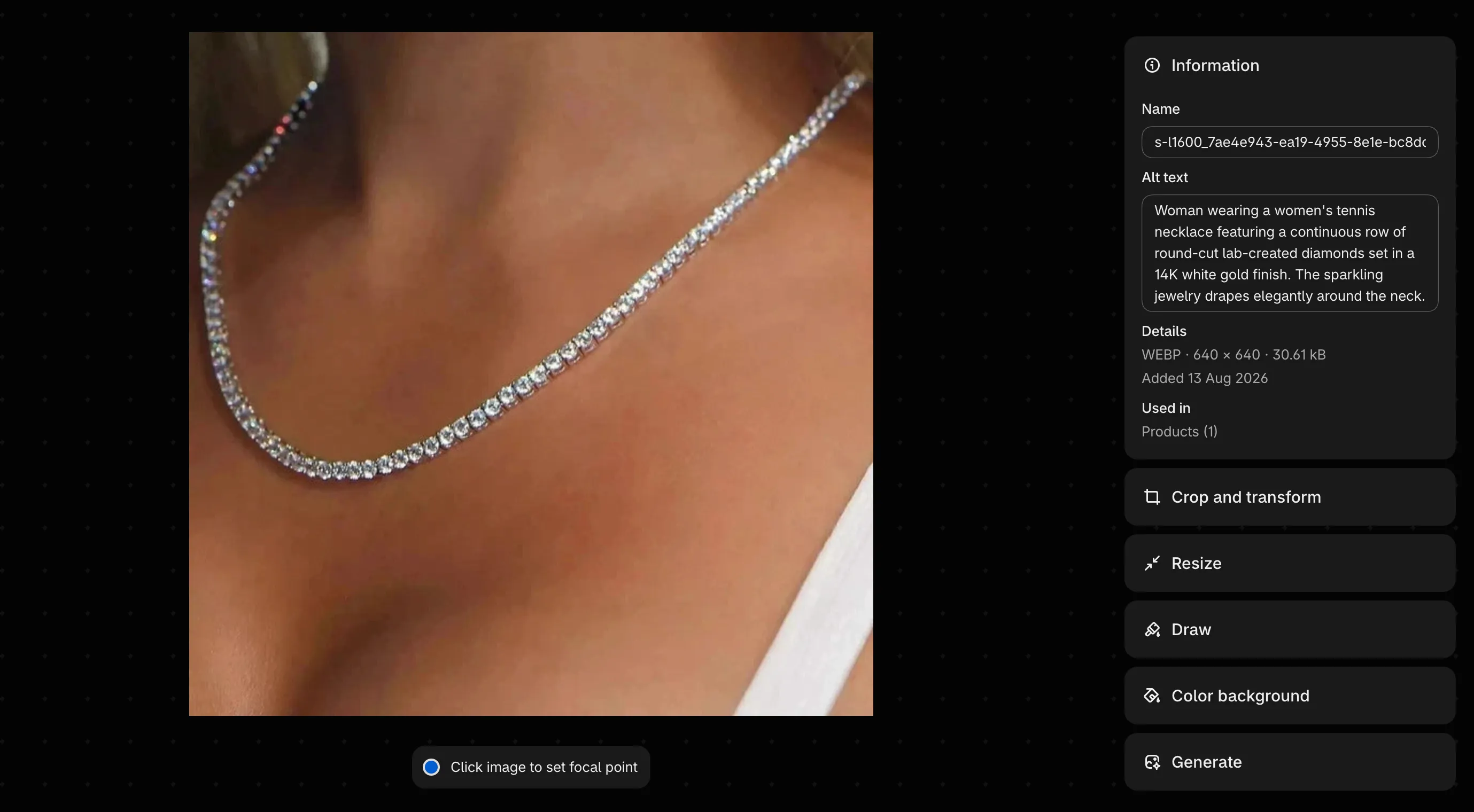
In Shopify, you can add alt text to product media and other supported images through the relevant editing interface. The exact steps depend on where the image is used.
Alt Text vs. Alt Tags vs. Image Titles
You’ll often see terms such as “alt text Shopify,” “Shopify alt tags,” and “Shopify image alt” used interchangeably in SEO discussions.
Technically, the correct term is the alt attribute. “Alt tag” is a common industry expression, but it is not the name of a separate HTML tag.
An image may look like this in HTML:
<img
  src="blue-ceramic-coffee-mug.jpg"
  alt="Blue ceramic coffee mug with a curved handle"
>
The src attribute identifies the image file. The alt attribute provides its text alternative.
Alt text is also different from an image title. The title attribute is a separate HTML attribute and does not serve as a replacement for meaningful alt text.
For more technical details, see the MDN documentation on the HTML image element.
Where Is Alt Text Used in a Shopify Store?
Shopify merchants work with several types of images. Each may need a different approach.
Common examples include:
- Product images: Show the appearance, features, materials, and details of a product.
- Collection images: Represent a product category, such as running shoes or kitchen accessories.
- Blog images: Illustrate tutorials, product comparisons, and other editorial content.
- Homepage banners: Communicate a promotion, brand message, or featured product.
- Informational images: Explain a process, demonstrate a feature, or present useful visual information.
Not every image needs a descriptive alt text value. Purely decorative images can use an empty alt attribute when they do not convey meaningful information.
The goal is to provide the right text alternative for each image, based on its purpose and context.
Why Shopify Alt Text Matters for SEO
Alt text supports both accessibility and image understanding. It is a useful part of image SEO, although it is not a ranking shortcut.
Help Search Engines Understand Your Images
Search engines use several signals to understand an image. These include the image itself, the surrounding page content, captions, file names, and alt text.
A product image named IMG_4837.jpg provides little information through its filename. An alt description such as “Black leather crossbody bag with an adjustable shoulder strap” gives search engines a clearer textual signal.
Google explains this process in its image SEO best practices documentation.
The key is consistency. If your product page describes a black leather bag, the image shows the same product, and the alt text accurately describes it, these elements provide a clearer picture of the page’s subject.
Alt text should never be used to compensate for a page with thin or irrelevant content. It works best as part of a well-structured product page.
Improve Your Chances of Appearing in Google Images
Google Images gives shoppers another way to discover products. Someone searching for a particular style, color, or product feature may find your store through an image result.
Descriptive alt text helps Google understand what an image depicts. It can therefore contribute to image discovery when combined with other relevant signals.
However, adding alt text does not guarantee that an image will be indexed or rank well.
Image quality, page relevance, technical accessibility, loading performance, and the overall usefulness of the page also matter. Google discusses these factors in its SEO Starter Guide.
For Shopify merchants, this means image optimization should be part of a broader SEO strategy rather than an isolated task.
Make Your Store More Accessible
Alt text also helps people who cannot see images clearly or at all.
Screen readers can announce the text alternative for meaningful images. This allows users to understand important product information without relying entirely on visual content.
Consider a product image showing a backpack with several compartments. A description such as “Gray travel backpack with a front pocket and two side pockets” communicates useful details to someone who cannot see the image.
A description like “Backpack product photo” provides much less information.
The W3C Web Accessibility Initiative’s Images Tutorial explains how to choose appropriate text alternatives for informative, decorative, functional, and complex images.
Good alt text should serve the person using the website first. Search engines benefit when the description is also accurate and relevant.
Support a Better Shopping Experience
Online shoppers often depend on images to understand what they are buying. Clear descriptions provide another way to communicate important details.
For example, a furniture store might describe a chair’s material and shape. A clothing store might describe the garment’s color and fit. A skincare store might identify the packaging and product type.
These details should match the actual image. If a feature is not visible, do not invent it just to make the description sound more informative.
Accurate descriptions support a more consistent shopping experience and reduce the risk of misleading information.
How to Add Alt Text to Images in Shopify
Adding alt text to Shopify product images is straightforward once you know where to look. Shopify also provides options for editing media through its media editor.
The following steps describe the general workflow. Interface labels may change as Shopify updates its admin.
How to Add Alt Text to Shopify Product Images
To add alt text to an individual product image:
- Log in to your Shopify admin.
- Go to Products.
- Open the product you want to edit.
- Click the relevant product image or media item.
- Open the image preview.
- Select Add alt text.
- Enter a brief, descriptive sentence.
- Save your changes.
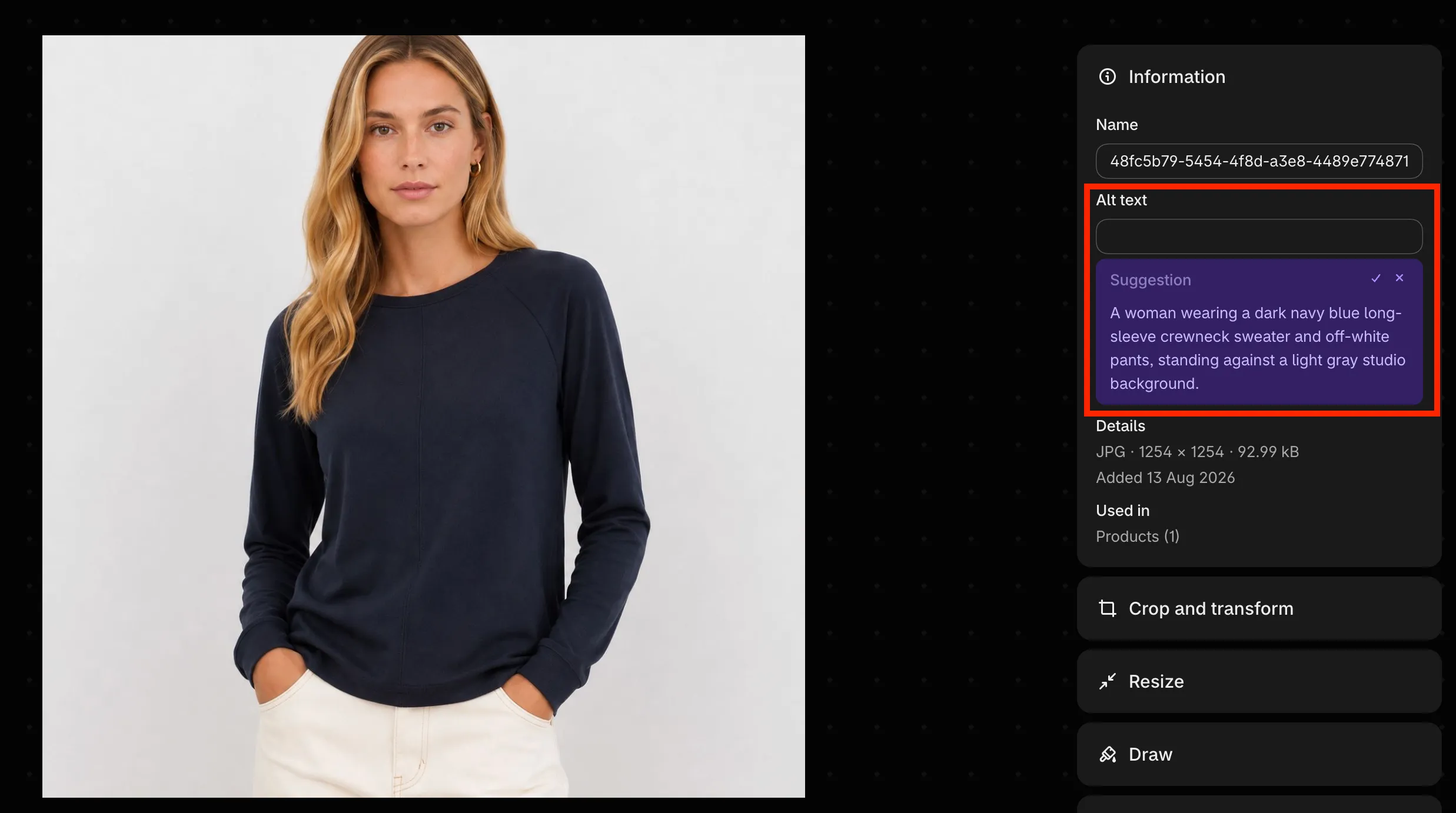
For example, if the image shows a white ceramic vase with a narrow neck, you could write:
White ceramic vase with a narrow neck and rounded base
Avoid using only the product name if the image contains additional details that help shoppers understand what they are viewing.
Shopify recommends keeping alt text brief and descriptive. Its help documentation suggests 125 characters or fewer, although the appropriate length depends on the image and the information it needs to convey.
For the latest interface instructions, consult Shopify’s guide to adding alt text to media.
How to Add Alt Text to Collection Images
Collection images help customers recognize product categories and navigate your store.
Start by opening the relevant collection in your Shopify admin. Check the available image settings and determine whether the image has a dedicated alt text field in your current workflow.
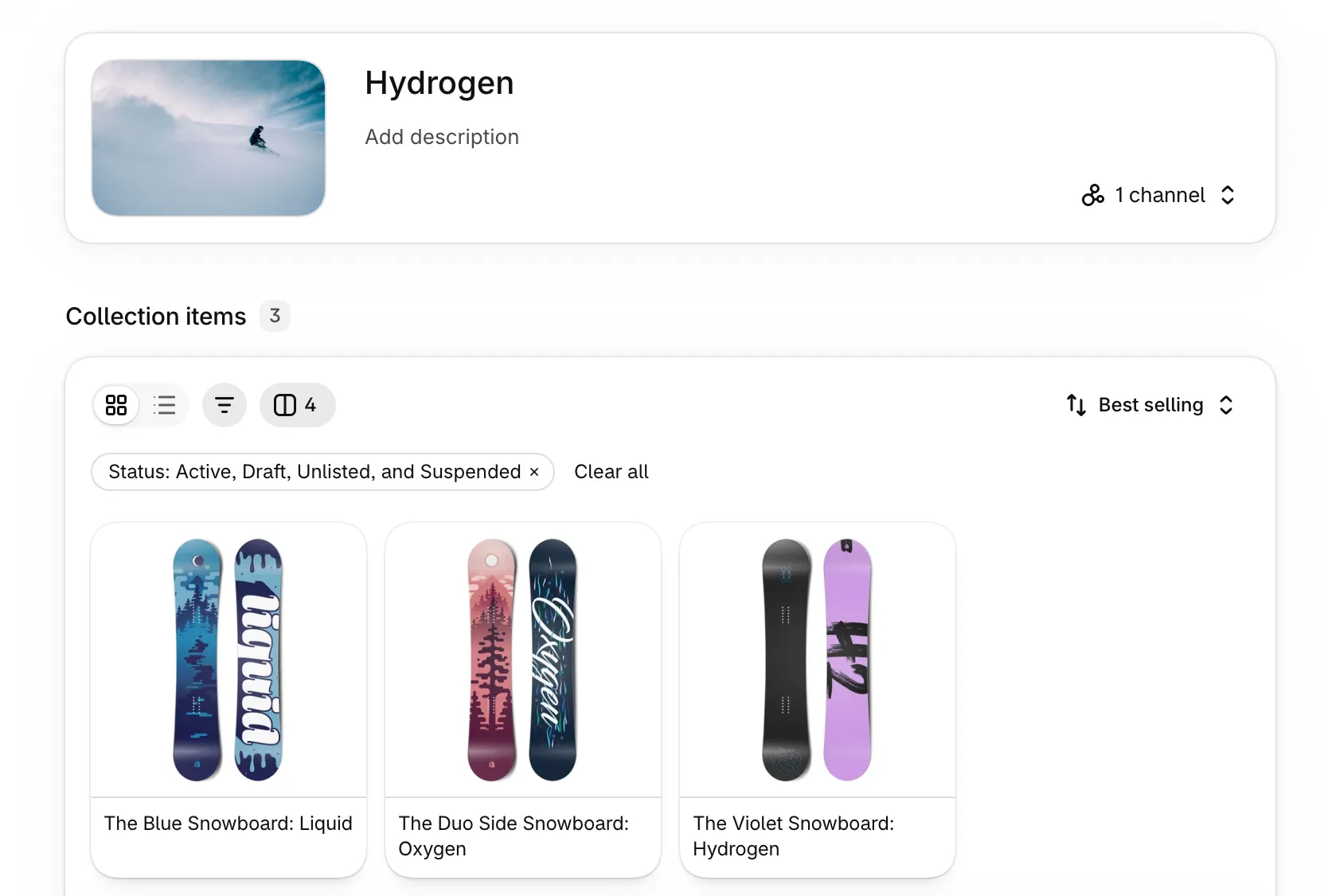
If the image is managed as a Shopify media file, you may be able to edit its alt text through the media editor.
The exact process depends on how the image is stored and displayed. If you cannot find an alt text field in the collection editor, check the media file’s editing options rather than assuming the setting is missing entirely.
Use a description that reflects the actual image.
For example:
Neutral-toned living room with a beige sofa and wooden coffee table
This is more useful than “Home collection image” if the visual content itself is relevant to the collection page.
How to Add Alt Text to Blog and Page Images
Blog posts and content pages often contain illustrations, screenshots, product photos, and decorative graphics.
When editing a blog post or page, select the image and check the editor’s image settings for an alternative text field.
For an instructional screenshot, describe the important action shown. For a product photo embedded in an article, describe the product and any relevant visible features.
For example:
Shopify product editor showing the alt text field for a product image
This description helps explain the screenshot’s purpose within a tutorial.
If an image is purely decorative and adds no meaningful information, an empty alt attribute may be appropriate. Do not force a description onto every decorative element simply to include keywords.
How to Check Whether Alt Text Has Been Added
After editing your images, it is worth checking that the changes have been saved and appear correctly on the storefront.
You can use several methods:
- Check the Shopify admin. Reopen the media item and review its saved alt text.
- Inspect the page HTML. Open the storefront in your browser, right-click an image, and choose the developer tools option to inspect it. Look for the
altattribute in the image element. - Run an image audit. An SEO crawler or image auditing tool can help identify images with missing alt attributes across multiple pages.
Remember that an empty alt="" attribute is different from a missing alt attribute. Empty alt text can be intentional for decorative images, so a report should be reviewed in context.
How to Write SEO-Friendly Shopify Alt Text
Writing good image descriptions is more about judgment than following a rigid formula. The best description tells people what matters about the image without adding unnecessary words.
Describe What Is Actually in the Image
Start with the visible content.
A useful description should identify the main subject and include relevant details when they help users understand the image.
Compare these examples:
Too vague:
Product image
More useful:
Beige linen cushion cover with a textured weave
The second description identifies the product, its color, material, and a visible feature.
Do not add details simply because they appear in the product listing. If the image does not show the product’s dimensions, for example, those measurements may not belong in the alt text.
Include Relevant Keywords Naturally
Keywords can help describe what an image represents, but they should never replace an accurate description.
Suppose your store sells a blue ceramic coffee mug. If that is what the image shows, including “blue ceramic coffee mug” is perfectly natural.
However, this is not useful:
Shopify coffee mug blue mug ceramic mug coffee cup best mug online
The text is repetitive and difficult to understand. It also attempts to target multiple variations of a keyword rather than describe the image.
Google advises website owners to use keywords appropriately and avoid stuffing alt attributes with search terms.
Think about the image first. If your target keyword accurately describes its main subject, use it where it fits naturally.
Keep Alt Text Clear and Concise
Alt text should communicate the important information without becoming a long product description.
For most product images, a short phrase or sentence is enough. You do not need to fill every available character.
For example:
Black wireless headphones with padded ear cups
This is clear and informative.
By contrast, a long paragraph describing every possible use, benefit, and selling point would be difficult to listen to with a screen reader and may include information the image cannot communicate.
Shopify recommends brief descriptions, with 125 characters or fewer as a useful guideline. Treat that as a practical reference rather than a requirement to make every description the same length.
Describe Details That Matter to Shoppers
Different product categories call for different details.
For clothing, useful visual details might include color, pattern, garment type, and fit.
For furniture, material, shape, and design may be more relevant.
For electronics, the device type, visible controls, and distinctive physical features may help.
For cosmetics, packaging color, container type, and visible product form may be useful.
You do not need to describe every detail. Choose the information that helps someone understand the image in the context of the page.
Give Different Product Images Different Descriptions
A common mistake is using identical alt text for every image attached to a product.
Imagine a backpack with five images:
- Front view
- Back view
- Interior compartments
- Shoulder straps
- Lifestyle photo showing the backpack being worn
Each image provides different information. The descriptions should reflect those differences.
This makes the descriptions more useful and avoids repeating the same generic text throughout the product gallery.
Do Not Add “Image of” to Every Description
Screen readers generally identify images as images. Starting every description with “Image of” or “Picture of” is often unnecessary.
Instead of:
Image of a red leather wallet
Use:
Red leather wallet with six card slots
The second version gets to the useful information more quickly.
There are exceptions when the fact that something is a photograph, illustration, or diagram matters to understanding the content. The goal is not to ban specific phrases but to avoid redundant wording.
For more practical guidance, see WebAIM’s guide to alternative text.
Shopify Alt Text Examples for Different Image Types
Examples are often the easiest way to understand how good alt text works in practice.
The following table shows how generic descriptions can be improved.
| Image Type | Weak Alt Text | Improved Alt Text |
|---|---|---|
| Clothing | Shirt | Black cotton T-shirt with a relaxed fit |
| Shoes | Running shoes | White running shoes with a mesh upper |
| Furniture | Chair | Oak dining chair with a curved wooden back |
| Skincare | Face cream | Glass jar of moisturizing face cream with a white lid |
| Jewelry | Necklace | Gold-colored pendant necklace with a small oval charm |
| Electronics | Headphones | Black wireless headphones with padded ear cups |
| Home decor | Wall art | Abstract blue and beige canvas art above a sofa |
| Toys | Building blocks | Colorful magnetic building blocks arranged into a small house |
| Kitchenware | Pan | Stainless steel frying pan with a long handle |
| Bags | Backpack | Green hiking backpack with multiple exterior pockets |
These examples are not templates that should be copied onto every similar product. The description must match the actual image.
Shopify Product Image Alt Text Examples
Product galleries often show the same item from different angles. Here is how you might approach a backpack product page.
| Image | Example Alt Text | Improved Alt Text |
|---|---|---|
| Main product photo | Green hiking backpack with a black front pocket | Black cotton T-shirt with a relaxed fit |
| Back view | Back of a green hiking backpack with padded shoulder straps | White running shoes with a mesh upper |
| Interior view | Main compartment of a hiking backpack with a zippered inner pocket | Oak dining chair with a curved wooden back |
| Detail photo | Close-up of the black zipper and reinforced stitching on a green backpack | Glass jar of moisturizing face cream with a white lid |
| Lifestyle photo | Hiker wearing a green backpack on a forest trail | Gold-colored pendant necklace with a small oval charm |
| Electronics | Headphones | Black wireless headphones with padded ear cups |
| Home decor | Wall art | Abstract blue and beige canvas art above a sofa |
| Toys | Building blocks | Colorful magnetic building blocks arranged into a small house |
| Kitchenware | Pan | Stainless steel frying pan with a long handle |
| Bags | Backpack | Green hiking backpack with multiple exterior pockets |
Notice that each description focuses on what the image actually reveals.
If a product has a feature that is not visible in a particular photo, there is no need to repeat that feature in the alt text. Product descriptions and specifications can communicate information that images cannot show clearly.
Shopify Image Alt Text for Lifestyle Photos
Lifestyle images show products in use. They can help customers understand scale, appearance, or context.
For example:
Woman wearing a beige raincoat while walking on a city street
This description identifies the subject and the context. If the page is specifically about the coat, that context makes the image more meaningful.
Avoid adding promotional claims such as “the best raincoat for all weather” unless those words are actually part of the image’s relevant text and need to be conveyed.
Alt text is not advertising copy. Its job is to communicate the image’s content or function.
What About Decorative Images?
Not every image needs a descriptive sentence.
A decorative divider, background flourish, or visual element that adds no meaningful information can use an empty alt attribute:
<img src="decorative-divider.svg" alt="">This tells assistive technology that the image can be skipped.
By contrast, an image containing important product information should not be treated as decorative simply because it looks attractive.
The W3C Images Tutorial provides further guidance on choosing between descriptive and empty alt text.
How to Bulk Edit Alt Text in Shopify
Manually editing images works well when you have a small catalog. It becomes less practical as the number of products grows.
Consider a store with 500 products and an average of four images per product. That is approximately 2,000 product images to review.
If every image requires an individual editing session, even a short task can become a significant project.
The solution is to choose a workflow that fits your catalog size and the quality of your existing image descriptions.
Can You Bulk Edit Alt Text Using Shopify?
Shopify provides several ways to manage media, and its supported workflows may change over time.
For example, Shopify’s documentation explains that alt text can be uploaded through a CSV file. This can be useful when you are managing product data outside the admin interface.
Before starting a bulk update, check the current import requirements and confirm which media fields your chosen workflow supports. Do not assume that every bulk product editor can modify every image’s alt text.
A careful process should include:
- Export or collect the relevant product and image data.
- Identify images with missing or outdated descriptions.
- Prepare the new descriptions in the required format.
- Confirm that each description matches the correct image.
- Import or update the data using a supported method.
- Check a sample of the updated products before reviewing the full catalog.
Always keep a backup of important data before making large changes.
Use a Shopify Alt Text App for Large Catalogs
When you have hundreds or thousands of images, a dedicated Shopify alt text app can make the workflow easier.
Instead of writing every description from scratch, you can use AI to generate initial descriptions and then review them for accuracy.
This is particularly useful for stores with large product catalogs, frequent product uploads, or multiple language requirements.
When evaluating a Shopify alt text app, consider the following:
- Bulk generation: Can it process multiple images without requiring you to edit each one individually?
- Missing alt text detection: Can it help identify images that still need descriptions?
- Language support: Can it generate descriptions in the languages your customers use?
- Customization: Can you specify relevant keywords, tone, language, and brand preferences?
- Accuracy: Do the generated descriptions reflect the actual images?
- Workflow and pricing: Does the app offer a practical way to process your catalog within your budget?
These details matter more than a long list of features that you may never use.
Generate Shopify Image Alt Text in Bulk with AI
For merchants looking to reduce repetitive work, Infi Images AI Alt Text offers an AI-powered approach to image optimization.
The app is designed to help Shopify merchants generate image alt text in bulk. It supports multiple languages and provides customization options for keywords, language, tone, and brand-related preferences.
It also offers a simple workflow, fast generation, and a V5 AI engine designed for generating relevant image descriptions.
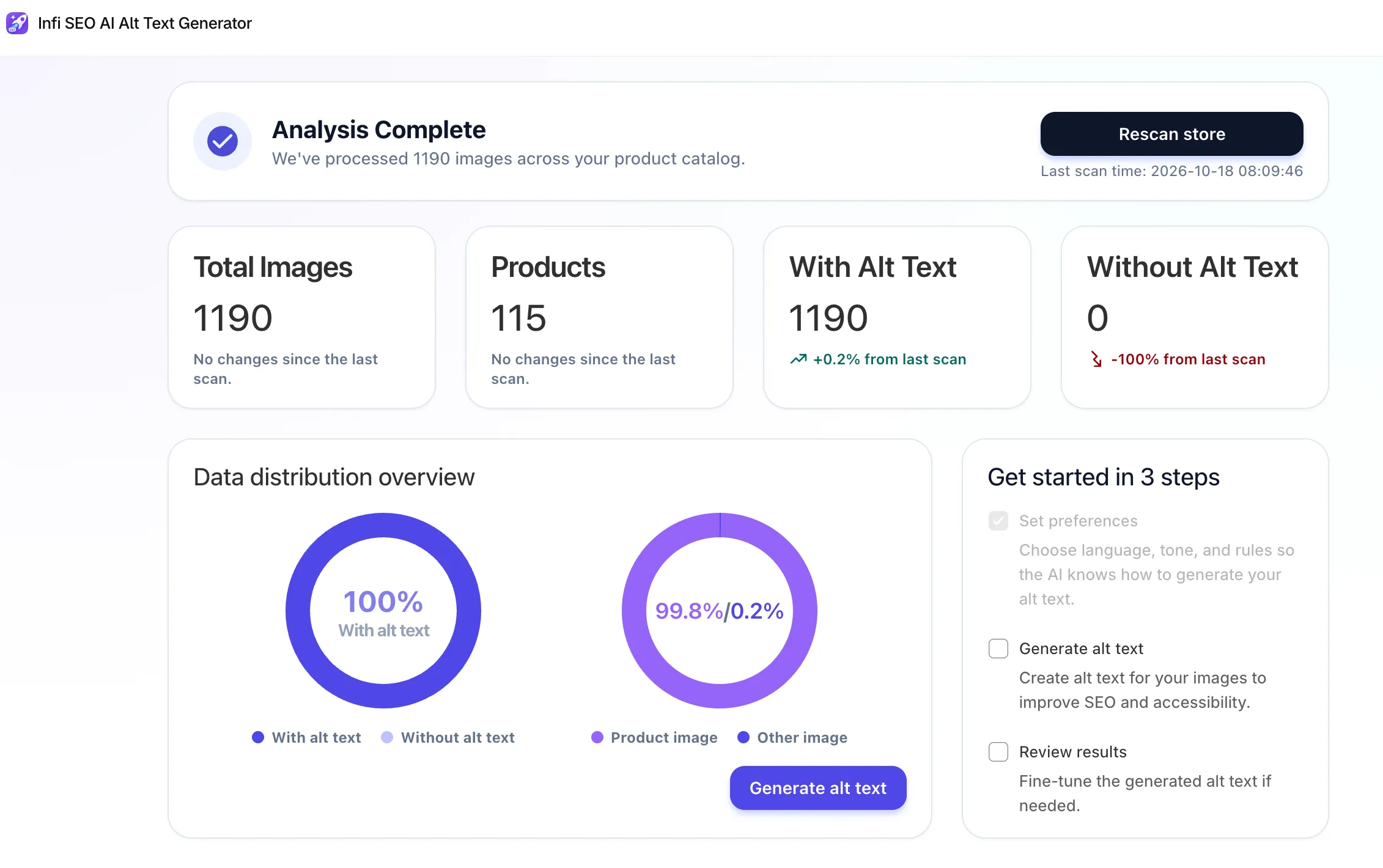
New users can start with 100 free credits each month, making it possible to try the workflow before deciding whether it fits their store’s needs.
AI generation can save time, especially when a catalog contains a large number of images. However, generated descriptions should still be reviewed. A model may occasionally miss a detail, misidentify a product feature, or describe something that is not clearly visible.
A sensible workflow is to generate, review, and refine. This combines the speed of automation with the accuracy that good image descriptions require.
How to Choose the Right Shopify Alt Text App
Not every store needs an app. If you manage a small catalog, manual editing may be sufficient. If your store has thousands of images, automation may save considerable time.
The right choice depends on your workload, budget, and requirements.
Look for Bulk Alt Text Generation
Check whether the app can process multiple images in one workflow. If you have a large catalog, this may be more useful than a tool that generates descriptions for one image at a time.
Also check whether the app can help you identify missing alt text, so you can prioritize images that need attention.
Check Language and Customization Options
Multilingual stores often need image descriptions in more than one language.
A useful tool should support the languages relevant to your customers. Customization options can also help you maintain consistent terminology and brand voice.
For example, a store selling technical equipment may need precise product terminology, while a home decor store may prefer simple descriptions focused on color, material, and design.
Understand How Existing Alt Text Is Handled
Before installing an app or running a large update, find out how it handles images that already have alt text.
Can it focus on missing descriptions? Does it overwrite existing text? Can you review the output before applying changes?
These questions are especially important if you have already spent time optimizing your catalog.
Avoid replacing accurate descriptions simply because a new version has been generated.
Compare Pricing and Workflow
Look at monthly credits, subscription costs, generation limits, and the amount of manual review required.
A tool that produces descriptions quickly may still require careful editing. Consider the total time saved, not just the number of images it can process.
For Shopify merchants who want to explore AI-assisted bulk generation, Infi Images AI Alt Text provides 100 free credits each month, along with multilingual generation and customization options.
Test it on a representative group of images first. This will help you judge whether the output quality and workflow suit your catalog.
Common Shopify Alt Text Mistakes to Avoid
Even when store owners understand the basics, a few common mistakes can reduce the usefulness of their image descriptions.
Leaving Important Product Images Without Alt Text
Missing descriptions can make meaningful images less accessible to screen reader users and give search engines less textual context.
Start with important product images, especially those showing distinctive product features. Then work through collection images and other relevant content.
Do not assume that every empty field is automatically an error, though. Decorative images may correctly use empty alt text.
Using the Same Description for Every Image
Repeating one generic description across an entire product gallery ignores the differences between images.
A front view, close-up, and lifestyle photo communicate different information. Write descriptions that reflect those differences.
If two images are genuinely identical or communicate the same information in the same context, their descriptions may reasonably be similar. Avoid forcing artificial differences just to make every description unique.
Stuffing Alt Text with Keywords
Alt text is not a place to list every keyword you want to rank for.
A description such as “Shopify shoes running shoes cheap shoes best running shoes” does not help a person understand the image.
Use natural language and include relevant terms only when they accurately describe the visible content.
Describing Features That Are Not Visible
AI tools and manual writers can both make mistakes.
For example, an image might show a leather-style bag, but the material may not be clear enough to determine whether it is genuine leather. Describing it as genuine leather could introduce an unsupported claim.
Use the product specifications where appropriate for the main product description, but keep image alt text grounded in what the image shows.
Writing Long Product Descriptions Instead of Alt Text
Alt text should not repeat the entire product description.
If your product listing already explains dimensions, warranty details, and shipping options, those details usually do not belong in the image’s alternative text.
Focus on the image itself. Keep other information in the page content where customers can read it.
Assuming Alt Text Alone Will Improve Rankings
Image SEO involves more than alt text. Search engines also consider page content, image quality, technical accessibility, and other relevant signals.
Use alt text as one part of a broader optimization process. Do not expect immediate ranking changes simply because you have filled in missing fields.
Shopify Alt Text SEO Checklist
Use this checklist when publishing new products or improving an existing catalog.
Before Publishing a Product
- Add descriptive alt text to meaningful product images.
- Describe what is actually visible.
- Include relevant details such as color, material, or design when useful.
- Use keywords naturally rather than repeating them.
- Give different product images descriptions that reflect their content.
- Use empty alt text for purely decorative images when appropriate.
- Review AI-generated descriptions for accuracy.
- Check that the saved descriptions appear correctly on the storefront.
When Optimizing an Existing Store
- Identify important images with missing alt text.
- Prioritize product and collection images.
- Review generic or repetitive descriptions.
- Check whether existing descriptions accurately represent the images.
- Use a supported bulk workflow for large updates.
- Keep a backup before making extensive changes.
- Review a sample of updated images.
- Include image optimization in your ongoing publishing process.
You do not need to fix every image in one day. Start with the pages and products that matter most to your business, then expand your efforts as time allows.
Frequently Asked Questions About Shopify Alt Text
What Is Alt Text in Shopify?
Shopify alt text is a written description associated with an image. It helps screen reader users understand meaningful visual content and provides search engines with additional information about the image.
Good alt text is brief, accurate, and relevant to the image’s purpose.
How Do I Add Alt Text to Images in Shopify?
Open your Shopify admin and navigate to the relevant product or media item. Select the image, find the alt text field, enter a description, and save your changes.
For detailed instructions, refer to the Shopify Help Center guide to adding alt text.
Does Shopify Alt Text Help SEO?
Yes, alt text can support image SEO by helping search engines understand an image’s subject matter.
However, it does not guarantee higher rankings. Image quality, relevant page content, technical accessibility, and other factors also influence how images are discovered and presented in search results.
Can I Bulk Edit Alt Text in Shopify?
Shopify supports certain media and data management workflows, including uploading alt text through CSV files. The exact process depends on the data format and the fields supported by the chosen workflow.
For larger catalogs, a dedicated app may provide a more convenient way to generate or manage many descriptions. Always verify the app’s features and review the results before applying extensive changes.
What Should I Write for Shopify Product Image Alt Text?
Describe the product and the important details visible in the image.
For example, instead of writing “Shoes,” you could write “White running shoes with a mesh upper and black rubber sole.”
The description should match the actual image. Avoid adding details that cannot be confirmed visually.
Should Every Shopify Image Have Alt Text?
Every image should have an appropriate alt attribute in the page’s HTML, but the value does not always need to contain a description.
Informative images need meaningful text alternatives. Purely decorative images can use an empty alt attribute, which allows screen readers to skip them.
The correct choice depends on the image’s purpose and context.
Is There a Shopify Alt Text App That Can Generate Alt Text Automatically?
Yes. AI-powered apps can generate descriptions for multiple images, reducing the amount of manual writing required.
Infi Images AI Alt Text supports bulk generation, multiple languages, and customization options for keywords, language, tone, and brand preferences. It also offers 100 free credits each month.
As with any AI-generated content, review the descriptions to make sure they accurately reflect the images.
Conclusion
Image alt text is a small detail that can make a meaningful difference to how people and search engines understand your Shopify store.
The best approach is simple: describe meaningful images accurately, keep the wording concise, use keywords naturally, and avoid repeating the same generic description across every product image.
For a small catalog, manual editing may be all you need. For a store with hundreds or thousands of images, a more structured workflow can make the task easier to manage.
If you want to reduce repetitive work, consider trying Infi Images AI Alt Text. Its bulk AI generation, multilingual support, customization options, and monthly free credits can help you explore a more efficient approach to image optimization.
Whatever method you choose, prioritize accuracy and accessibility. Better image descriptions are not just about search rankings. They also help make your store’s visual content more useful to the people who visit it.